MouseWizard

MouseWizard
License:
Trial version
Language:
English
Developer:
Developer's website
OS:
Mac OS X
Updated:
See detailed info

Softonic review

Nick Mead

“Get more from your Magic Mouse or trackpad”

by Nick Mead about MouseWizard

The Magic Mouse is Apple's latest innovation, superseding the good old Mighty Mouse and employing touchscreen technology to make maneuvering and surfing easier and more responsive.

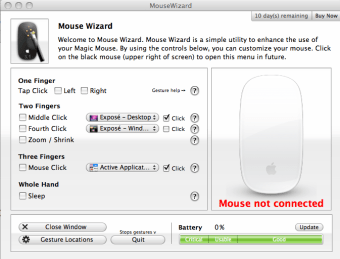
Like the Mighty Mouse however, the Magic Mouse can be a bit limited at times so expect a whole line of Magic Mouse software like MouseWizard to come along and extend its functionality. MouseWizard is a very simple utility which enhances the use of your Magic Mouse and allows you to customize it to increase your productivity.

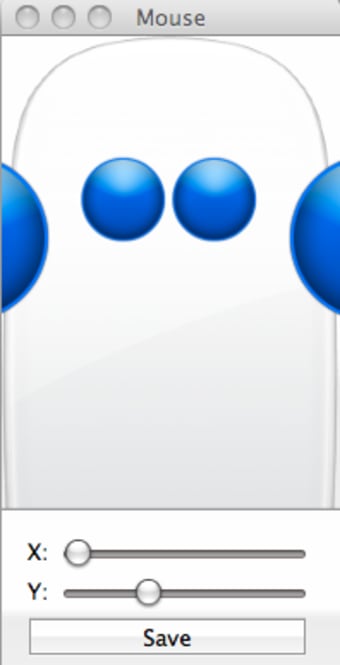
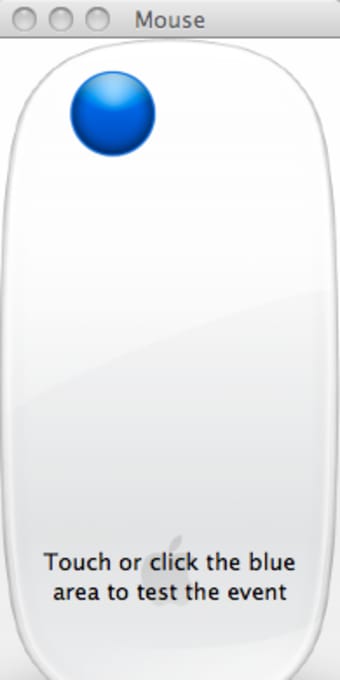
The main advantage of MouseWizard is that it adds three extra buttons, namely, 'pinch', 'bloat', and 'tap to click' trackpad gestures. It also features a few special add-ons, such as 'coverup' to put your Mac into sleep mode. The main interface is very easy to use, allowing you to configure what type of clicks do what such as configuring a middle-click for Exposé or a fourth click to open Spotlight etc. If you get stuck, a handy wizard takes you through the configuration process by telling you where to place your hands on the Magic Mouse.

The major benefit of MouseWizard is enabling you to have a middle mouse button which many people criticized when Magic Mouse was released. At the moment though, there is a known issue with the battery indicator not working with MacBooks, although the developer is looking into this.

MouseWizard is a well designed application that adds much needed functionality to the Magic Mouse.

Pros
  • Easy to configure your Magic Mouse
  • Help wizard if you get stuck
  • Increases productivity by making clicks more meaningful
  • Adds much needed middle button
Cons
  • Battery level indicator problem with MacBooks
Download MouseWizard 6.0.1

MouseWizard is virus free

We have analyzed the latest version of MouseWizard with 30 antivirus engines and it is virus free. See analysis results.

TESTED VIRUS FREE - Softonic GUARANTEED

MouseWizard (1) User reviews

  • rank_0
  • 0/10
  • magicmice magicmice
    User reviews
    1
    • rank_0
    • 1/10
    on the buggy side

    good try but too poorly designed , especially for a commercial application , sticking with magicprefs has more features , less bugs and it is free... More

    • Review of MouseWizard - 21 Dec 2009
      This review is liked by 5 of 8
Your avatar
Review
  1. Maximum: 75 characters

  2. See example

Pros and Cons
Rate
  1. What rating would you give MouseWizard?

    You need to fill in all fields

    • Usability:

      Not rated
    • Stability:

      Not rated
    • Installation:

      Not rated
    • Functionality:

      Not rated
    • Appearance:

      Not rated
    • Overall rating:

      Not rated
  2. Don't worry, we won't make your email address public.

You're not allowed to share serial numbers, cracks, etc. or link to pages that contain them. If you do, your user account will be deleted, your IP address logged and legal action will be taken.

Get started - just ask a question!

Write a title for your question.

Alternativesto MouseWizard

  • In English:
    SideTrack
    SideTrack

    An alternative to using your iBook or PowerBook mouse

    Softonic rating:
    • 7/10
    User rating:
    • 9/10
  • Free:
    BetterTouchTool
    BetterTouchTool

    Excellent Touchpad and Magic Mouse software

    Softonic rating:
    • 9/10
    User rating:
    • 10/10
Compare with MouseWizard
Download rank: Mouse & Keyboard

10 of 35

Softonic rating:
  • Excellent
  • 9/10
Your rating:
Your rating
  • 0

Review and rate this program

Blog posts about MouseWizard

More

Top Downloads: Mouse & Keyboard

  • United States
  • Global

  1. BetterTouchTool

    Excellent Touchpad and Magic Mouse software

  2. Logitech Touch Mouse Server
  3. All The Right Type
  4. Ten Thumbs Typing Tutor
  5. MagicPrefs

Reviews of MouseWizard in other languages